Works with the platforms you already run.
VMwareHyper-V ProxmoxOpenStack BetaNutanix AHV BetaLinux KVM

Supported sources and destinations differ by capability. View the compatibility matrix.

ONE PLATFORM. THREE CRITICAL CAPABILITIES.

Built for every stage of the journey.

From your first migration to everyday resilience, give your infrastructure a simpler path forward.

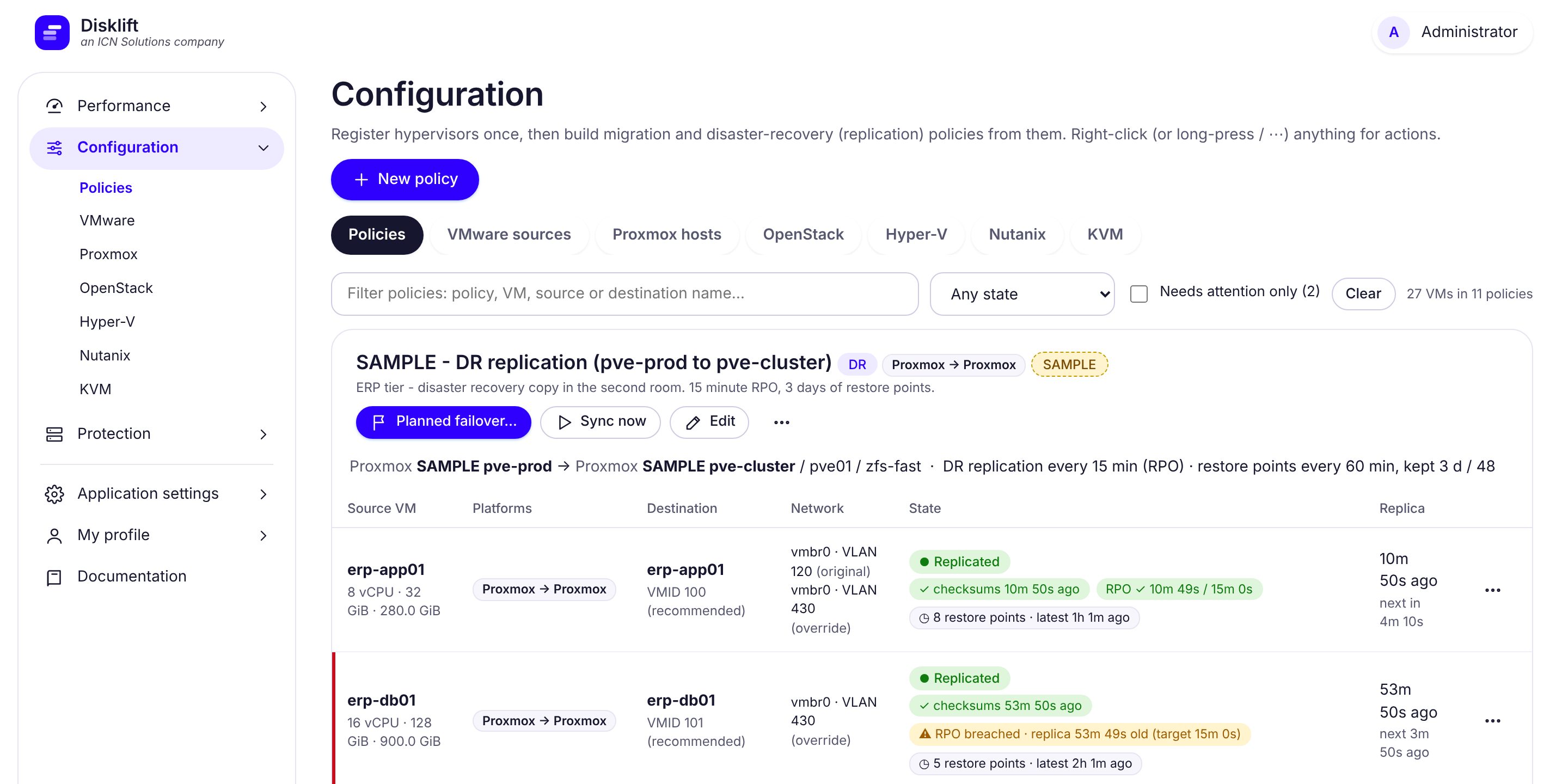
Disklift Configuration page: migration and disaster-recovery policies across VMware, Proxmox, Hyper-V, OpenStack, Nutanix AHV and KVM 01 / MIGRATE

Configuration: register each hypervisor once, then build migration and disaster-recovery policies from them (sample data).

Move without the headache.

Move virtual machines from VMware, Hyper-V and other supported sources to your next platform. Copy while workloads run, then plan the final cutover.

Migration & infrastructure modernization Explore migration
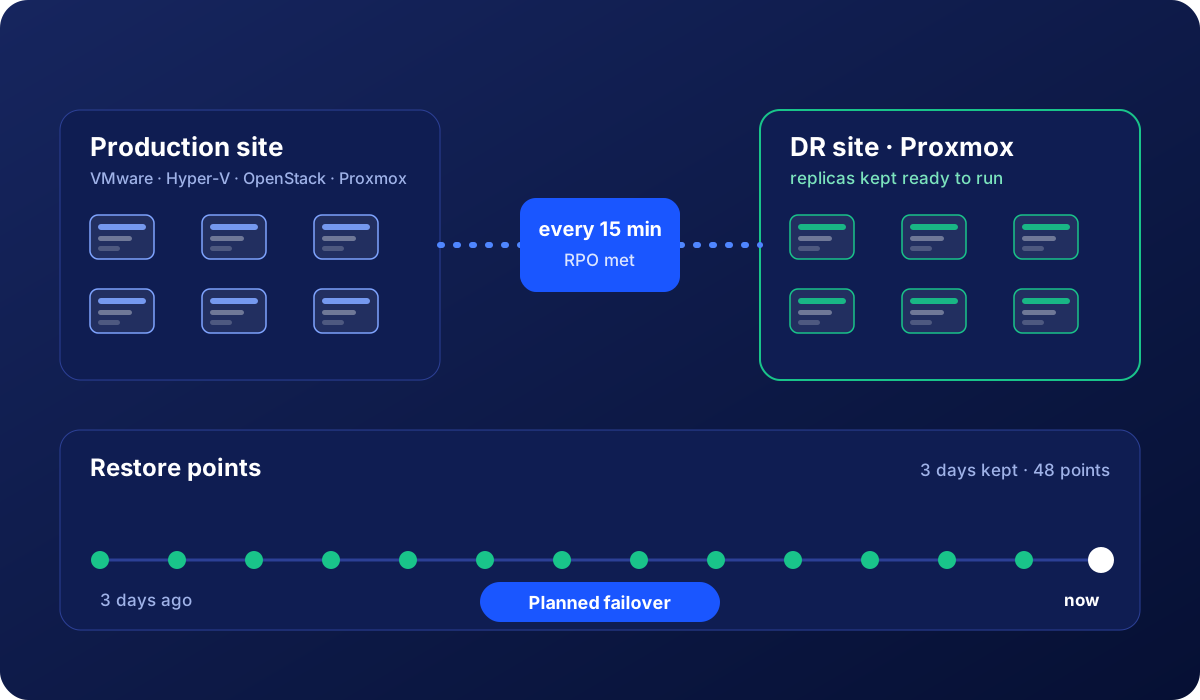
Disklift disaster recovery replication illustration showing production workloads replicated to a recovery site with ready-to-run standby copies 02 / REPLICATE

Illustration: production workloads replicated to a recovery site as ready-to-run standby copies.

Stay ready for the unexpected.

Keep standby copies current on supported DR routes, track recovery-point lag, and test failover without disrupting production.

Disaster recovery & continuity Explore replication
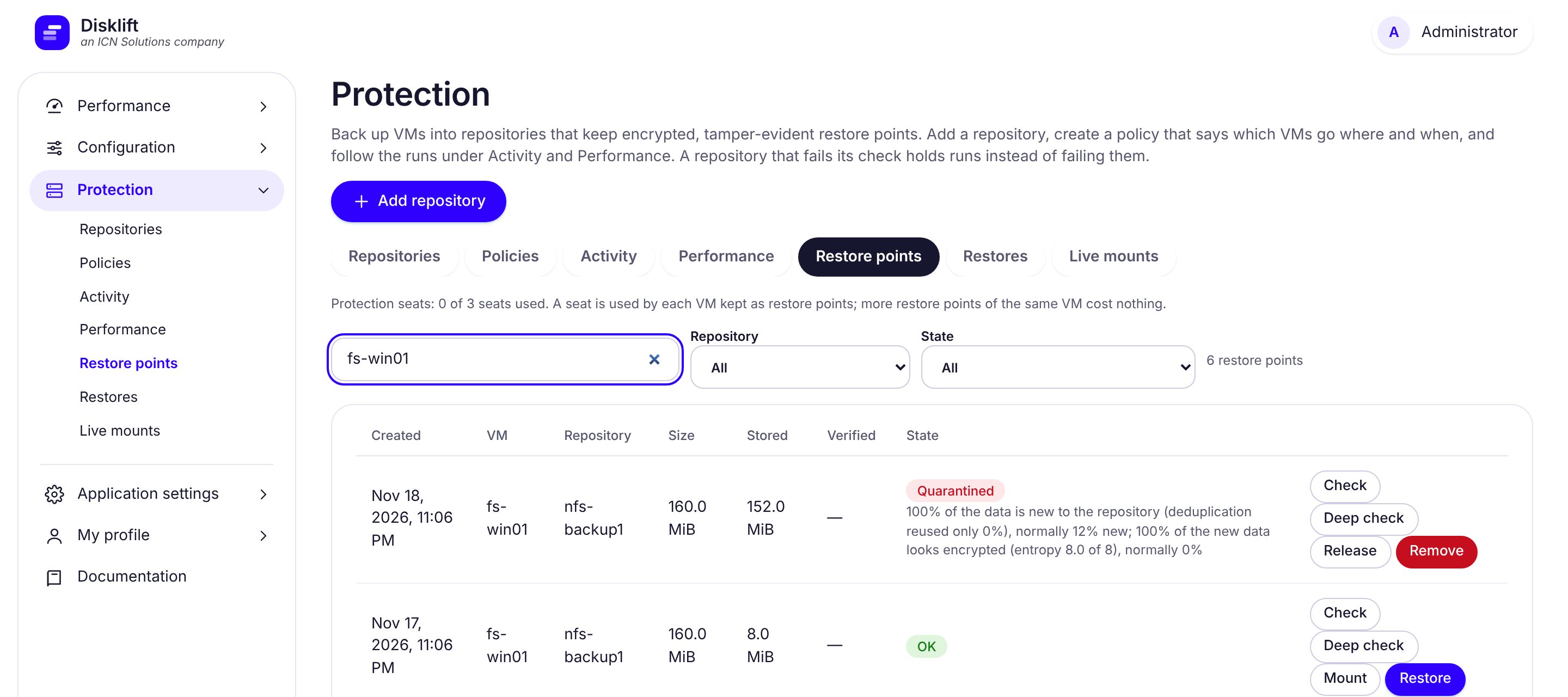
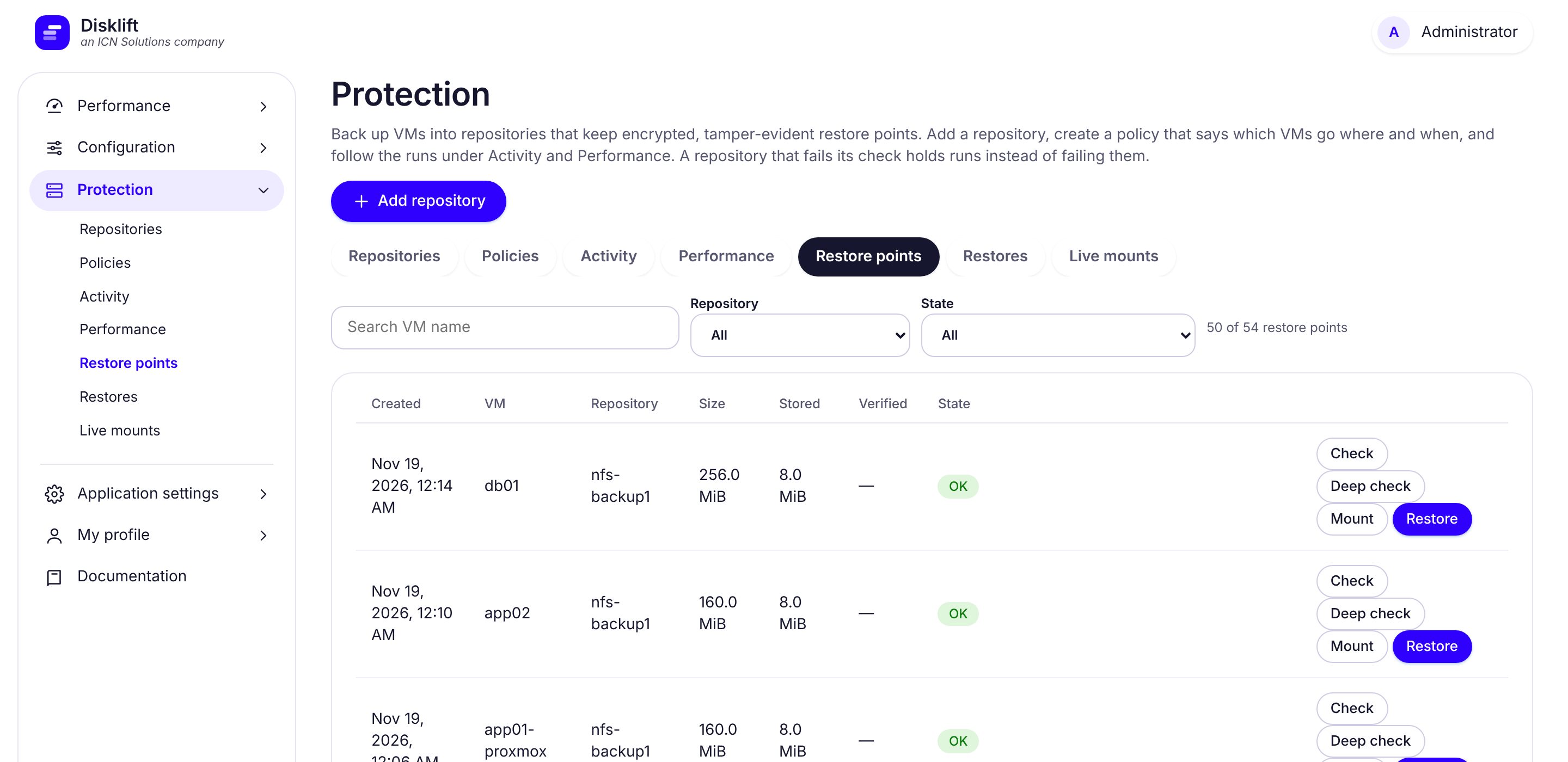
Disklift backup restore-points interface showing protected virtual machines 03 / PROTECT

Restore points: every protected VM's points with size, stored size and state, and Check, Deep check, Mount and Restore beside each (sample data).

Put recovery in your hands.

Schedule encrypted backups to NFS, S3 or mounted SAN storage, review restore points, track measured capacity reduction and investigate suspicious changes before restoring data.

Backup & ransomware resilience · Separately licensed option Explore protection
DISKLIFT PLATFORM CAPABILITIES

Migration, protection and recovery — managed together.

Use the workflows supported by your source and destination platforms, with centralized monitoring, protection policies and support diagnostics.

Established migration paths

Move workloads from VMware, Hyper-V, OpenStack, Nutanix AHV and Linux KVM to Proxmox, or between supported same-platform endpoints. Check the operation-specific compatibility matrix before creating a policy.

View supported paths →

Backup & storage efficiency

Protect VMs in NFS and S3-compatible repositories or host-mounted iSCSI/FCoE filesystems. View measured storage reduction and transfer efficiency in compact 2.2x-style ratios when counters are available.

Explore Protection →

Recovery & visibility

Access restore points through authenticated NBD live mounts on Proxmox/KVM, run unified hypervisor diagnostics, and inspect read-only LLDP/Cisco CDP neighbors from the Network page.

Explore operations →
VISIBILITY WITHOUT THE GUESSWORK

See everything. Control every move.

One appliance to connect your environment, manage workflows and see what is happening — without installing software inside every VM.

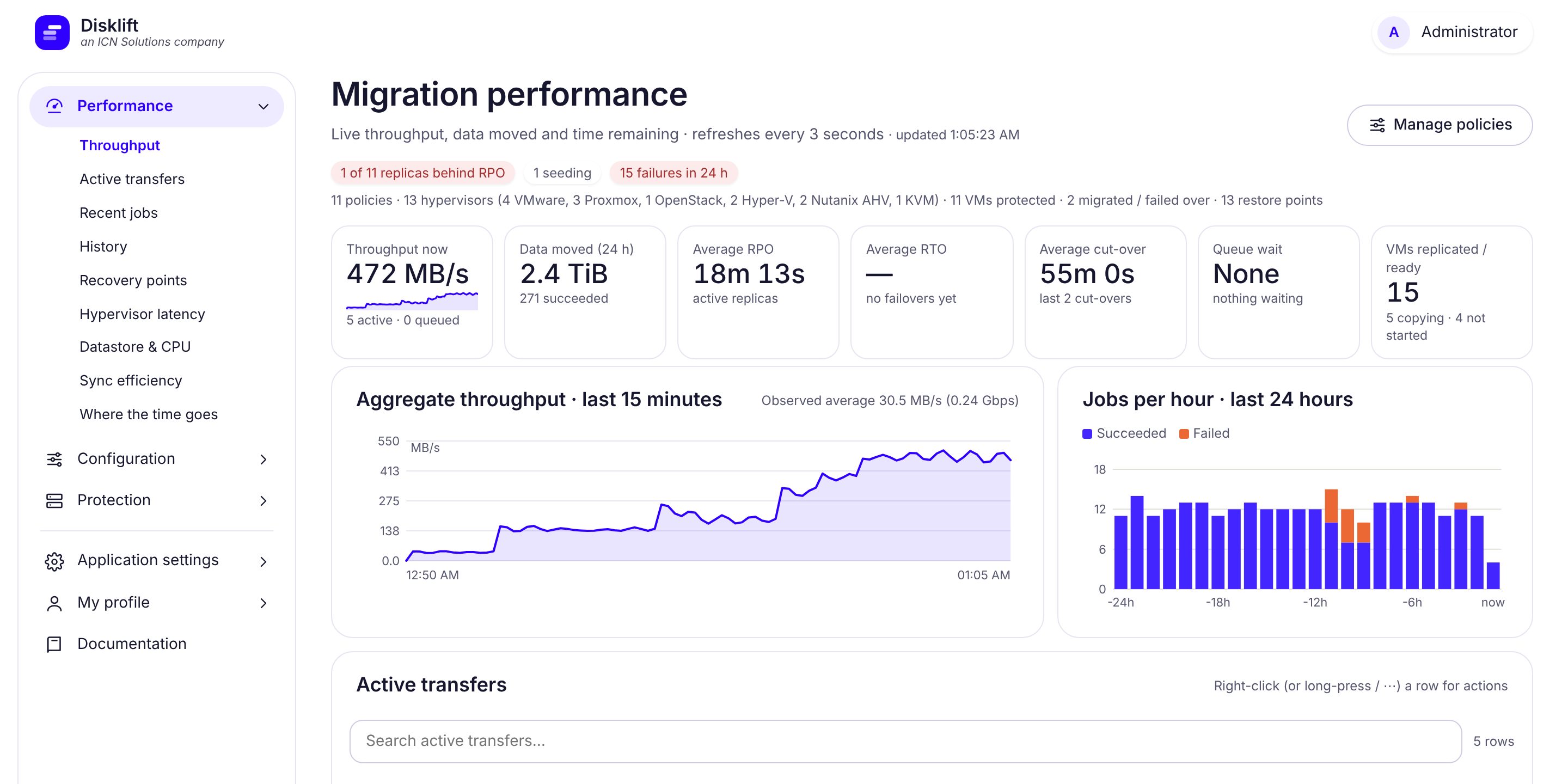
Disklift / Migration performanceACTUAL PRODUCT SCREEN
Disklift application dashboard: migration performance, throughput charts, and active transfers

Migration performance: throughput charts and active transfers in one view, so you can see what is moving, how fast, and what finished. Select any screenshot on this page to enlarge it.

01

Guided workflows

Choose a source, a destination and a workload. Follow progress as jobs run.

02

Real-time visibility

Review speed, job status, history and errors in a single interface.

03

Operational control

Manage your infrastructure from an appliance in your own environment.

New in Disklift 2.20

  • Supported migration & DR paths — select source and destination endpoints from the compatibility matrix, with route-specific preflight checks.
  • Backups that read only what changed — VMware CBT, Hyper-V RCT, Proxmox ZFS / Ceph and Nutanix changed regions, with every restore point still complete on its own.
  • Faster to S3 — parallel uploads fill a 1 Gbit/s link to a distant region.
  • Live mounts that set themselves up — mount a restore point's files or start a test VM on a Proxmox or KVM host.
  • Built for many policies — search, filters, paging and collapsible cards across Protection.
See all features
BUILT FOR INFRASTRUCTURE TEAMS

Trust is earned in the details.

Infrastructure software needs to be dependable, transparent and under your control. These are the design choices built into Disklift.

Review the technical features

Your data stays yours

Transfers go to the destination you choose; backups can be held in your NFS or S3-compatible storage.

Encrypted & verified

Protection uses AES-256-GCM encryption and tamper-evident checks on backup data.

Controls & auditability

Administrator, operator and read-only roles, two-step appliance sign-in and audit trails.

A company behind the product

Developed by ICN Solutions, LLC, with a customer support portal and direct contact options.

Clear licensingSigned appliance updates30-day evaluationContact ICN Solutions ↗
PLATFORM COMPATIBILITY

Supported platforms and migration destinations.

Available destinations vary by operation. This matrix lists the existing migration, DR and Protection workflows rather than unverified route adapters.

Current environmentMigrationReplication / DRProtection
VMware (vCenter / ESXi)To Proxmox or VMwareTo ProxmoxSupported
Hyper-VTo ProxmoxTo Proxmox and Hyper-V ReplicaSupported
ProxmoxTo ProxmoxTo ProxmoxSupported
OpenStack BetaTo Proxmox or OpenStackTo ProxmoxSupported
Nutanix AHV BetaTo Proxmox or Nutanix AHV NewTo Proxmox or Nutanix AHV NewSupported
Linux KVM (libvirt)To Proxmox or KVMTo Proxmox or KVM—

Protection is separately licensed. Restore options differ from backup-source support; see full features and restore details.

START WITH A REAL WORKLOAD

From download to first job, in three steps.

Evaluate Disklift in your own environment before you choose a license.

01

Deploy the appliance

Download the VMware OVF appliance or the shared QCOW2 image for Proxmox VE, Nutanix AHV, and Linux KVM. Follow your platform guide.

02

Connect your platforms

Add the supported hosts or systems you want to migrate, replicate or protect.

03

Run and monitor

Choose your VMs and destination, then follow progress and review job results.

The standard free evaluation runs for 30 days, with up to 5 VMs for migration and 3 for standby replication. Download QCOW2 · Proxmox / Nutanix AHV / KVM install guides · All download instructions

QUESTIONS, ANSWERED

No surprises.
Just clarity.

The key details before you install, evaluate or buy.

Talk to the Disklift Sales team
Will the source servers stop during a migration?

They remain running during the initial copy. The final cutover needs a short stop while the last changes are transferred; duration depends on the workload and environment.

Can I run the Disklift QCOW2 appliance on Proxmox, Nutanix AHV, or KVM?

All three accept QCOW2 as an import format. Disklift provides one QCOW2 image with separate deployment instructions. Follow the first-boot instructions and change the initial console password before exposing the VM to other networks. Validate your specific image's guest boot on each platform.

Do I install agents on each virtual machine?

No. Disklift works at the virtualization platform level and does not require software installed inside every VM.

Where do backup files go?

To NFS, S3-compatible storage, or host-mounted iSCSI/FCoE filesystems you configure. Protection encrypts backups, while SAN repositories require existing host mounts.

What if a job is interrupted?

Disklift includes mechanisms to resume and verify transferred data. It can also report job status and alerts through supported notifications.

How does licensing work?

Migration is priced per VM as a one-time license; disaster recovery and separately licensed Protection are priced per VM per year. Review pricing.

Can I speak with a real support team?

Yes. ICN Solutions, LLC offers a customer support portal plus phone and email contact.

READY WHEN YOU ARE

Your next move starts here.

Download Disklift, test it with your own workloads, and move forward with confidence.